by Michele | Aug 29, 2024 | Community, Events, Indigenous Justice, Learning Opportunity, LGBTQIA+ and Two-Spirit people, News, Resources, Right Relations, Social Justice
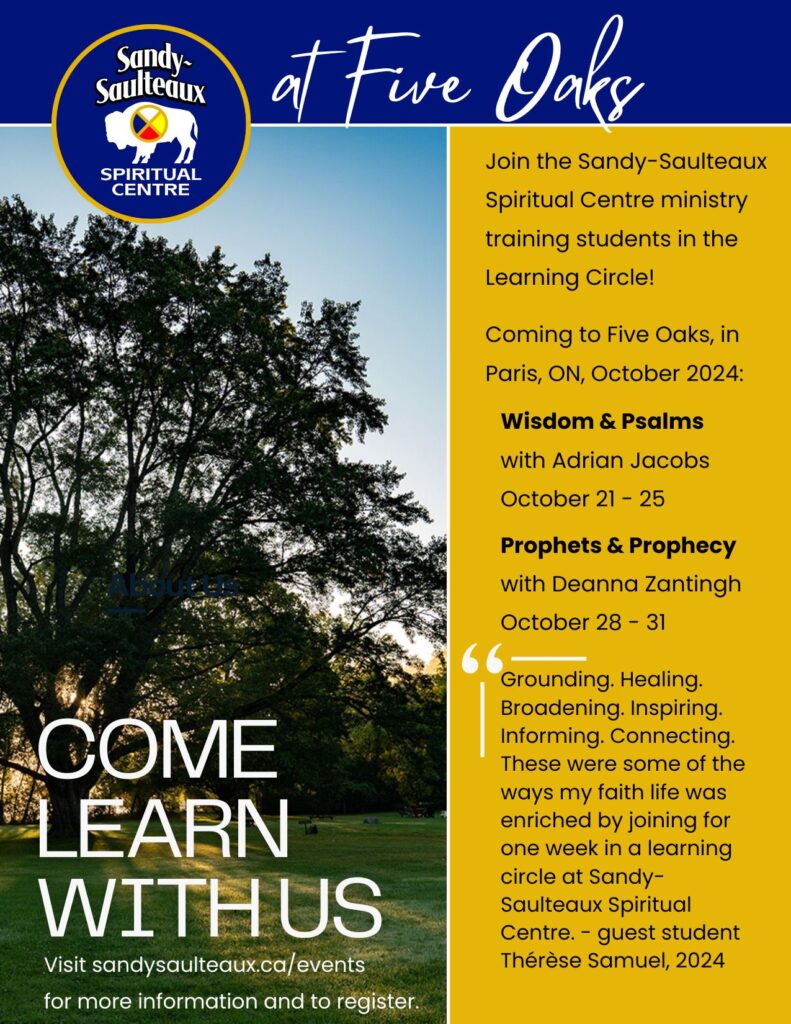
Looking for continuing education that will grow your understanding of ministry from Indigenous perspectives? Join the Sandy-Saulteaux Spiritual Centre ministry training students in a learning circle.
October-21-25-2024-5-day-registration-form-Wisdom-and-Psalms
October-28-31-2024-4-day-registration-form-Prophets-and-Prophecy
For more information visit: sandysaulteaux.ca/events.
You can also contact your regional council Minister for Right Relations and Social Justice, Thérèse Samuel tsamuel@united-church.ca

by Michele | Aug 21, 2024 | Community, Learning Opportunity, News, Regional Council, Resources

This summer we have become aware of a “payroll scam” targeting ministry personnel and other staff members of churches.
How the Payroll Scam works:
- Scammers review websites of churches and learn the positions of each staff member to understand the staff structure in an attempt to steal staff’s salary.
- After they get to know who the staff members are and what their role is within the church, they target a particular staff member(s) and create an email address that is very similar to the person’s real email address ie minister@butterflyuc.com to minister1@butterflyuc.com and then use that email to contact the treasurer or bookkeeper to have their payroll auto-deposit banking information changed.
- Another way a scammer can get access to staff email address is by hacking into the churches email server and gain control over staff emails. Once they have this control they can send an email directly from the staff members real account to community members or other staff. These emails will only be detected if the staff member check their “sent” emails.
- The outcome of the payroll scam is the targeted staff member is only alerted on pay day when their payroll is not deposited into their account and then contacts the church payroll administrator to find out a false request has been made to alter their payroll information. The payroll is deposited into the scammers account and will be a financial loss to the church.
How to avoid the Payroll Scam:
- Ensure that the payroll administrator on your staff team whether they are the treasurer, bookkeeper or church administrator use extra precautions when processing changes to payroll details for staff members.
- The best precaution is to respond in person or by telephone to verify any payroll information change requests.
- Have the staff member fill out a payroll change form in the office with a witness.
- Develop basic security protocols within the staff team and church council as an example, two staff members must approve financial transactions on behalf of the church ie cheque signing, payroll changes etc.
- Install trustworthy web security systems on all church devices.
Stay alert and be safe online and on the phone.
[Photo: John Schnobrich via Unsplash]
by Michele | Aug 8, 2024 | Affirming, Anti-Racism, Community, Events, Global Community, LGBTQIA+ and Two-Spirit people, News, Regional Council, Resources, Social Justice, The United Church of Canada
As Pride season continues, hate incidents, assault, hostility and pushback in communities across the nation are on the rise, and some of these incidents go unreported and/or undocumented.
The United Church of Canada is beginning to collate information on these incidents, to map out patterns and also to encourage reporting, create awareness, and support advocacy initiatives.
Unfortunately many congregations and other ministries have already experienced anti-2SLGBTQIA+ pushback. The regional council has created a reporting form for such incidents. Should you experience any incidents, please fill out the form and help us work together to address the pushback against 2SLGBTQIA+ rights and wellness here:
Incident Form
And may you have a happy and safe summer.
Thérèse Samuel
Minister, Right Relations and Social Justice
Antler River Watershed, Western Ontario Waterways, Horseshoe Falls
TSamuel@united-church.ca

by Michele | Aug 6, 2024 | Affirming, Community, Global Community, LGBTQIA+ and Two-Spirit people, News, Regional Council, Social Justice, The United Church of Canada
Photo Credit Hannah Voggenhuber via Unsplash
Feedback on a draft apology to members of the 2S and LGBTQIA+ communities by The United Church of Canada
The United Church of Canada’s Apology Task Group invites feedback on a draft apology to members of the 2S and LGBTQIA+ communities harmed by The United Church of Canada. This is a part of the United Church’s commitment to continued learning, reconciliation and action. A volunteer apology task group was appointed in November 2023, to draft an intentional living apology that moves beyond a statement to explicit action. Recognizing the need for apologies to be lived into with action, the apology task group has developed this statement in response to the findings of Iridesce: The Living Apology Project and the 2011 National LGBT Consultation, for which feedback is welcome. Further engagement with communities of faith is planned in town hall meetings commencing later this Fall.
The draft and feedback survey can be found here.
At the 42nd General Council, the church approved support for a national process of a Living Apology installation project for dialogue, story-telling, education, and reconciliation with persons who identify as sexual or gender diverse including but not limited to Two-Spirited, Lesbian, Gay, Bi-sexual, Transgender, Queer persons. The Iridesce: The Living Apology Project launched in 2017 and was a collaboration between the General Council Office (GCO) and Affirm United/S’affirmer Ensemble (AU/SE).
Over three years, the project gathered stories from across the United Church and submitted its final report to the General Secretary in July 2020. Upon review of the report, it was recommended that the General Council Office (GCO) form a working group to recommend follow-up actions to the General Council Executive. The working group concluded and submitted formal recommendations for follow-up on the Iridesce Project in January 2023. Among the recommendations was the crafting and offering an apology to 2S and LGBTQIA+ communities.
The apology task group members are Rev. Tricia Gerhard , Rev. Michiko Bown-Kai, Christine Dolson, Rev. Aaron Miechkota and Frederick Monteith. Further inquiries can be directed to Rev. Tricia Gerhard at minister@westworth.ca or through the GCO liaison to the task group, Jane Thirikwa at jthirikwa@united-church.ca.