by Michele | Aug 29, 2024 | Community, Events, Indigenous Justice, Learning Opportunity, LGBTQIA+ and Two-Spirit people, News, Resources, Right Relations, Social Justice
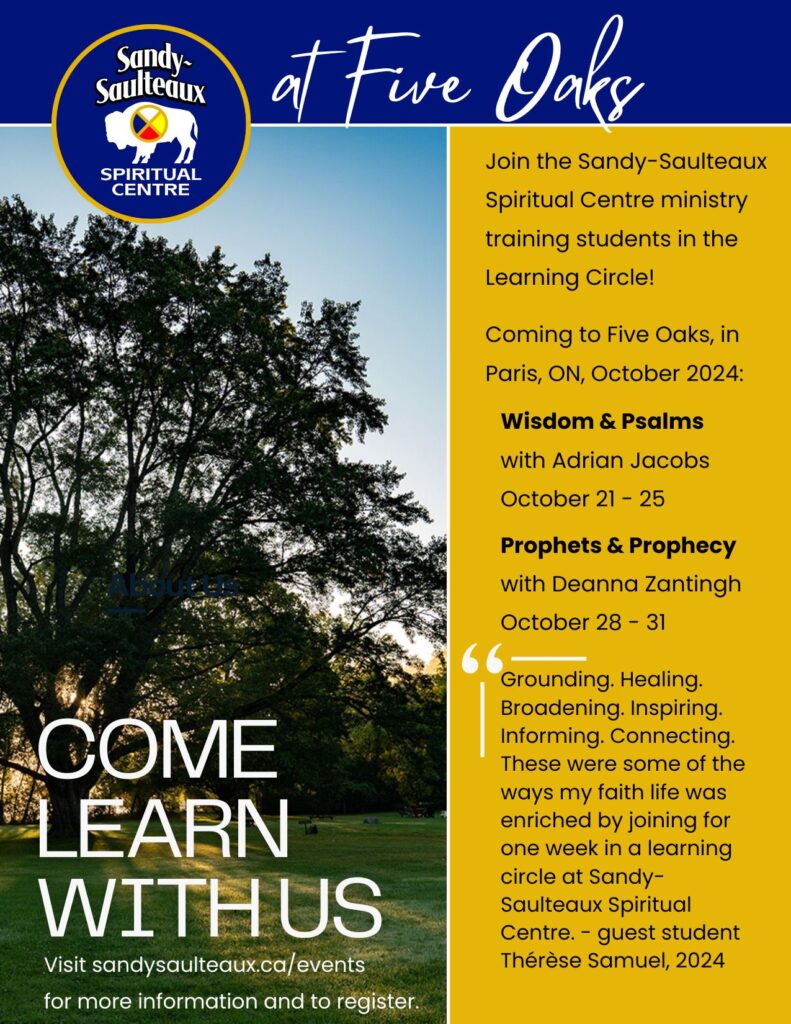
Looking for continuing education that will grow your understanding of ministry from Indigenous perspectives? Join the Sandy-Saulteaux Spiritual Centre ministry training students in a learning circle.
October-21-25-2024-5-day-registration-form-Wisdom-and-Psalms
October-28-31-2024-4-day-registration-form-Prophets-and-Prophecy
For more information visit: sandysaulteaux.ca/events.
You can also contact your regional council Minister for Right Relations and Social Justice, Thérèse Samuel tsamuel@united-church.ca

by Michele | Aug 21, 2024 | Affirming, Anti-Racism, Camps & Retreats, Children & Youth, Climate Change, Community, Events, Funds & Grants, Global Community, Indigenous Justice, Learning Opportunity, LGBTQIA+ and Two-Spirit people, Mission & Service, News, Pastoral Relations, Regional Council, Resources, Right Relations, Social Justice, Staff, Stewardship, The United Church of Canada, UCW, Volunteer

by Michele | Aug 21, 2024 | Community, Learning Opportunity, News, Regional Council, Resources

This summer we have become aware of a “payroll scam” targeting ministry personnel and other staff members of churches.
How the Payroll Scam works:
- Scammers review websites of churches and learn the positions of each staff member to understand the staff structure in an attempt to steal staff’s salary.
- After they get to know who the staff members are and what their role is within the church, they target a particular staff member(s) and create an email address that is very similar to the person’s real email address ie minister@butterflyuc.com to minister1@butterflyuc.com and then use that email to contact the treasurer or bookkeeper to have their payroll auto-deposit banking information changed.
- Another way a scammer can get access to staff email address is by hacking into the churches email server and gain control over staff emails. Once they have this control they can send an email directly from the staff members real account to community members or other staff. These emails will only be detected if the staff member check their “sent” emails.
- The outcome of the payroll scam is the targeted staff member is only alerted on pay day when their payroll is not deposited into their account and then contacts the church payroll administrator to find out a false request has been made to alter their payroll information. The payroll is deposited into the scammers account and will be a financial loss to the church.
How to avoid the Payroll Scam:
- Ensure that the payroll administrator on your staff team whether they are the treasurer, bookkeeper or church administrator use extra precautions when processing changes to payroll details for staff members.
- The best precaution is to respond in person or by telephone to verify any payroll information change requests.
- Have the staff member fill out a payroll change form in the office with a witness.
- Develop basic security protocols within the staff team and church council as an example, two staff members must approve financial transactions on behalf of the church ie cheque signing, payroll changes etc.
- Install trustworthy web security systems on all church devices.
Stay alert and be safe online and on the phone.
[Photo: John Schnobrich via Unsplash]

by Michele | Aug 2, 2024 | Learning Opportunity, News, Resources

Did your Minister leave and run off with the sign in credentials to your church’s Facebook account? Did the volunteer on your communications team finish their term and didn’t give you access to your YouTube or Canva accounts? Is one of your staff members on leave and not accessible to retrieve passwords to your MailChimp or X accounts? Need to set up a meeting but don’t have the password to the Zoom account and your Church Administrator left abruptly.
You could be left out in the cold and shut out of your online church accounts like MailChimp, Facebook, Instagram, X, Canva, MailChimp, Constant Contact, YouTube, Vimeo etc.
The importance of setting up more than one administrator of your online church accounts has never been more important. The importance of having more than one leader, staff member or volunteer the ability to access your online accounts for church business has excelled as we move much of our messaging and communications online in digital formats.
Gone are the days where file folders of paper can be handed over to new staff or ministry personnel or committee members.
Two-Factor Authentication(2FA) or One Time Passcodes (OTP) are our new reality with bad actors coming up with new scams daily. Two-Factor Authentication and One Time Passcodes are important ways to verify your church’s identity and the user logging in. These 2FA or OTP notices should go to Communications or Administrative emails or phone numbers not to personal phone numbers for verification.
Best Practices:
- Assign more than one administrator on accounts such as Facebook. Many online and social media platforms offer differing levels of permission to be assigned to administrators depending on their responsibilities, so it isn’t necessary to turn over full control of your accounts, but a person can be given permissions limited to posting and replying to posts, for example.
- Make sure the Two-Factor Authentication (2FA) or One Time Passcodes (OTP) go to an accountable staff or volunteer person that is available to access where these authorizations land.
- Separate personal and business emails when creating accounts for your community of faith. Church email accounts should be set up as an example “administrator[your church name or initials]@gmail.com”.
- Create a secure password log to be held by your church treasurer or administrator
- Set up a dedicated communications or media email account that can be accessed by more than one accountable staff or volunteer member to be used for online community of faith accounts.
Consider using a social media management platform where you can manage access to multiple platforms from one place. The General Council Office uses Hootsuite, and there are many others to choose from, such as Buffer.
[Photo Sara Kurfess via Unsplash]
Submitted by Michele Petick, Websites and Social Media Manager, Administrative Assistant
Antler River Watershed, Horseshoe Falls, Western Ontario Waterways Regional Councils.

by Michele | Jun 28, 2024 | Affirming, Anti-Racism, Camps & Retreats, Children & Youth, Climate Change, Community, Events, Fundraiser, Funds & Grants, Global Community, Indigenous Justice, Learning Opportunity, LGBTQIA+ and Two-Spirit people, Mission & Service, News, Pastoral Relations, Regional Council, Resources, Right Relations, Social Justice, Staff, Stewardship, The United Church of Canada, UCW, Volunteer

We’re trying something new. We’re introducing an Ask An Expert series in partnership with the General Council Office. You ask the questions, and we’ll provide the expertise.
Who are the experts? Well, it depends on the topic and staff availability.
Maybe you want to know more about the insurance partnership between the GCO and Communities of Faith. Or what you do when the local newspaper calls (or when you want to get a good story out). Or what the new government relations officer does. Or what the cost-of-living-adjustment is.
It’s kind of like a Pick-Your-Own-Adventure book. Here’s how it works:
1. You send us your questions here: https://forms.office.com/r/q7UM9spU9z
2. We find the expert who can answer them.
3. We all tune in on Wednesday September 18th, 7-8 p.m. by Zoom here: https://united-church.zoom.us/j/89972136949
4. As many questions will be answered as can be within the allotted time. Unanswered questions will carry over to the next session, or we’ll answer them on our Regional Council Facebook group.
5. Tough questions are okay. We’ll do our best to answer them, and if we can’t on the spot, we’ll follow up with the right information.
So, pick your adventure. Will it be insurance? Or grants? Climate justice? Governance? Media relations? Government relations? Global partnerships? Or something else?
You pick. Ask your question here: https://forms.office.com/r/q7UM9spU9z. Join us on Wednesday September 18th at 7 p.m. to get an answer in real time. Don’t have a question right now? Listeners welcome!
This session will be facilitated by: Michelle Owens

by Michele | Apr 22, 2024 | Community, Events, Learning Opportunity, News, Regional Council, The United Church of Canada, Volunteer

You are invited to a
General Information Town Hall on what’s involved with becoming a:
GC 45 Commissioner
via Zoom Meeting
Monday April 29th, 2024 at 7pm
Join Regional Council Executive Minister, Rev. Mark Laird to discuss becoming a GC 45 Commissioner with others and get your questions answered.
- Questions?
- Not sure?
- Learn more.
- Find out why you would want to put your name forward.
- Don’t think you qualify to apply? You do not have to be Ministry Personnel or a Lay Representative to be a Commissioner.
|
|
| Please join by Zoom:
Topic: GC45 Commissioners Town Hall
Time: Apr 29, 2024 07:00 PM Eastern Time (US and Canada)
Join Zoom Meeting
https://united-church.zoom.us/j/82957433893?pwd=pgOMc2Y4EH567NGkaFXcCquWqeaOMW.1
Meeting ID: 829 5743 3893
Password: 216767
By Phone Dial by your location
* Please use local numbers when feasible to save costs for the church. *
+1 647 374 4685 Canada
+1 647 558 0588 Canada
+1 778 907 2071 Canada
+1 438 809 7799 Canada
+1 587 328 1099 Canada
855 703 8985 Canada Toll-free |
|
|